Real-time data updates in your React DataGrid
By radu·
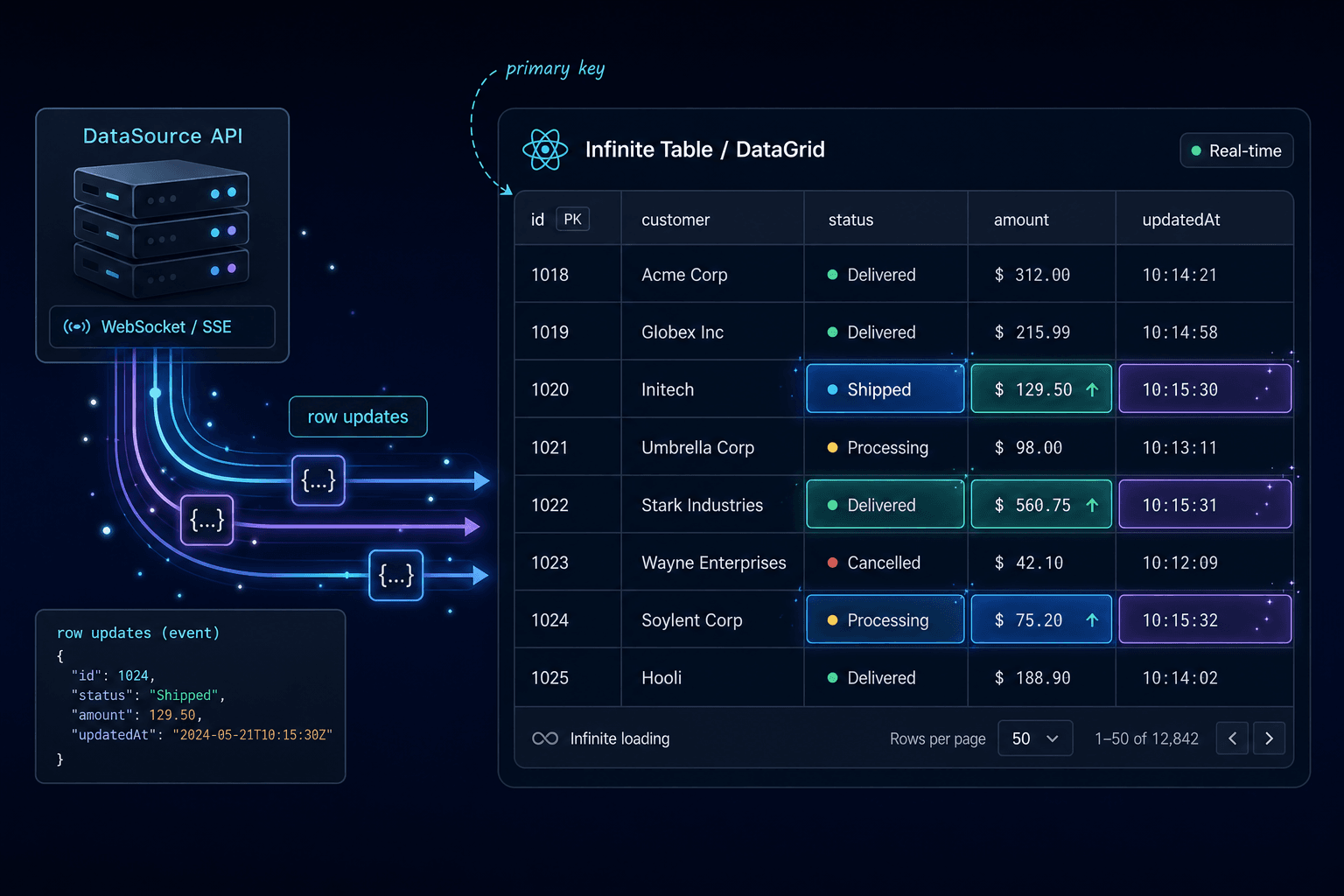
Most data grids are not showing static data. Dashboards receive fresh metrics, trading screens react to price changes, logistics apps track moving assets, and admin tools often need to reflect edits made by other users.
Infinite Table already has a dedicated for for updating data in real time, and this article adds more guide on how you can update the
DataSource, not the whole grid.The DataSource API owns row updates#
The
DataSource component is responsible for loading, processing, and preparing data for <InfiniteTable />. When you need to change rows after the grid is mounted, use the DataSource API.The
<InfiniteTable /> component doesn't need to be a direct child of the <DataSource />You can get access to the DataSource API from
DataSource.onReady:const onReady = (dataSourceApi) => {
// store the dataSourceApi and use it when updates arrive
};
<DataSource onReady={onReady} />; COPY
Or from
InfiniteTable.onReady, where you receive both the grid API and the DataSource API:const onReady = ({ api, dataSourceApi }) => {
// api controls grid behavior
// dataSourceApi controls data updates
};
<DataSource primaryKey="id" data={data}>
<InfiniteTable onReady={onReady} />
</DataSource>; COPY
Update one row by primary key#
To update a row, call
dataSourceApi.updateData with an object that includes the configured primaryKey field. Any other fields you include are merged into the existing row data.dataSourceApi.updateData({ id: 42, salary: 124000, currency: 'USD', reposCount: 37, });
COPY
This keeps the update local to the row data that changed. You do not need to rebuild the whole array just because one value moved.
Update many rows without creating render noise#
When several rows change together, use
dataSourceApi.updateDataArray.dataSourceApi.updateDataArray([ { id: 42, salary: 124000, currency: 'USD', }, { id: 73, salary: 118500, currency: 'EUR', }, ]);
COPY
The docs call out an important implementation detail: DataSource row mutations are batched by default. Multiple insert, update, or delete calls made in the same
requestAnimationFrame resolve through the same promise and trigger one render pass.const firstUpdate = dataSourceApi.updateData({
id: 1,
salary: 115000,
});
const secondUpdate = dataSourceApi.updateData({
id: 2,
salary: 99000,
});
firstUpdate === secondUpdate; // true COPY
That batching matters when updates are frequent. It lets your app react to a stream of changes while Infinite Table keeps the rendering work grouped.
See it with 10k rows#
The live demo below uses the same example from the Live Updates docs page. It loads 10k rows and, when started, updates five rows from the visible viewport every 30ms.
Click Start updates to update visible rows in real time. The example uses the DataSource API to change individual rows without replacing the whole dataset.
View Mode
Fork Forkimport * as React from 'react'; import '@infinite-table/infinite-react/index.css'; import { DataSourceApi, InfiniteTable, InfiniteTableApi, InfiniteTablePropColumns, DataSource, } from '@infinite-table/infinite-react'; type Developer = { id: number; firstName: string; lastName: string; currency: string; salary: number; preferredLanguage: string; stack: string; canDesign: 'yes' | 'no'; age: number; reposCount: number; }; const dataSource = () => { return fetch(`${'https://data.infinite-table.com'}/developers10k-sql`) .then((r) => r.json()) .then((data: Developer[]) => { return data; }); }; export function getRandomInt(min: number, max: number) { return Math.floor(Math.random() * (max - min + 1) + min); } const CURRENCIES = ['USD', 'CAD', 'EUR']; const stacks = ['frontend', 'backend', 'fullstack']; const updateRow = (api: DataSourceApi<Developer>, data: Developer) => { const getDelta = (num: number): number => Math.ceil(0.2 * num); const initialData = data; if (!initialData) { return; } const salaryDelta = getDelta(initialData?.salary); const reposCountDelta = getDelta(initialData?.reposCount); const newSalary = initialData.salary + getRandomInt(-salaryDelta, salaryDelta); const newReposCount = initialData.reposCount + getRandomInt(-reposCountDelta, reposCountDelta); const newData: Partial<Developer> = { id: initialData.id, salary: newSalary, reposCount: newReposCount, currency: CURRENCIES[getRandomInt(0, CURRENCIES.length - 1)] || CURRENCIES[0], stack: stacks[getRandomInt(0, stacks.length - 1)] || stacks[0], age: getRandomInt(0, 100), }; api.updateData(newData); }; const ROWS_TO_UPDATE_PER_FRAME = 5; const UPDATE_INTERVAL_MS = 30; const columns: InfiniteTablePropColumns<Developer> = { firstName: { field: 'firstName', }, age: { field: 'age', type: 'number', style: ({ value, rowInfo }) => { if (rowInfo.isGroupRow) { return {}; } return { color: 'black', background: value > 80 ? 'tomato' : value > 60 ? 'orange' : value > 40 ? 'yellow' : value > 20 ? 'lightgreen' : 'green', }; }, }, salary: { field: 'salary', type: 'number', }, reposCount: { field: 'reposCount', type: 'number', }, stack: { field: 'stack', renderMenuIcon: false }, currency: { field: 'currency' }, }; const domProps = { style: { height: '100%', }, }; export default function App() { const [running, setRunning] = React.useState(false); const [apis, onReady] = React.useState<{ api: InfiniteTableApi<Developer>; dataSourceApi: DataSourceApi<Developer>; }>(); const intervalIdRef = React.useRef<any>(null); React.useEffect(() => { const { current: intervalId } = intervalIdRef; if (!running || !apis) { return clearInterval(intervalId); } intervalIdRef.current = setInterval(() => { const { dataSourceApi, api } = apis!; const { renderStartIndex, renderEndIndex } = api.getVerticalRenderRange(); const dataArray = dataSourceApi.getRowInfoArray(); const data = dataArray .slice(renderStartIndex, renderEndIndex) .map((x) => x.data as Developer); for (let i = 0; i < ROWS_TO_UPDATE_PER_FRAME; i++) { const row = data[getRandomInt(0, data.length - 1)]; if (row) { updateRow(dataSourceApi, row); } } return () => { clearInterval(intervalIdRef.current); intervalIdRef.current = null; }; }, UPDATE_INTERVAL_MS); }, [running, apis]); return ( <React.StrictMode> <button style={{ border: '2px solid var(--infinite-cell-color)', borderRadius: 10, padding: 10, background: running ? 'tomato' : 'var(--infinite-background)', color: running ? 'white' : 'var(--infinite-cell-color)', margin: 10, }} onClick={() => { setRunning(!running); }} > {running ? 'Stop' : 'Start'} updates </button> <DataSource<Developer> data={dataSource} primaryKey="id"> <InfiniteTable<Developer> debugId="realtime-updates-example" domProps={domProps} onReady={onReady} columnDefaultWidth={130} columnMinWidth={50} columns={columns} /> </DataSource> </React.StrictMode>
When to use this pattern#
Reach for the DataSource API when data changes after initial load:
- websocket or Server-Sent Events feeds
- polling that returns changed records
- optimistic updates after user edits
- background imports that append or remove rows
- dashboards where visible values change continuously
For simple local state, replacing the
data prop can be fine. For ongoing row-level changes, the DataSource API gives you a clearer contract: every mutation includes the primary key, and Infinite Table handles the data update pipeline.Start with the docs page on updating data in real time, then open the live updates example and adapt the update loop to your app's data source.